

A laptop that runs flat between lessons, or a shared device left unattended on a desk, costs time, money, and usually someone’s patience. Probe laptop lockers remove both problems — lockable compartments keep devices secure, and PowerBox charging models keep them ready for the next use without staff chasing individual chargers.
Manufactured in Britain from welded steel and finished with ActiveCoat, Probe’s antibacterial coating tested against MRSA and E.coli, the range covers everything from a single staff device to a full class set of 16 or more. Every unit is configured to match your devices and your access requirements, not the other way around.


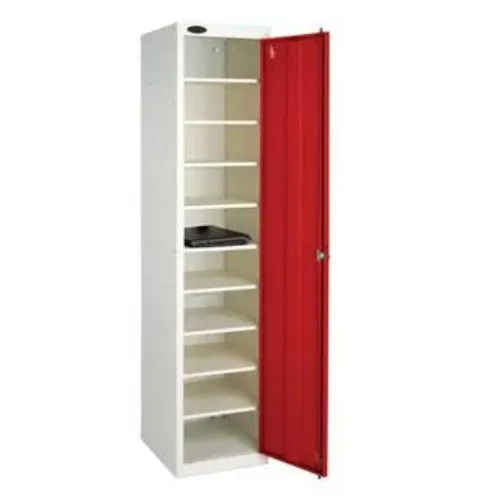
Where devices are charged at a desk or taken home, these laptop storage lockers focus on security. Choose between individual locking compartments per device, or a single-door unit with internal shelving — the latter suits settings where one staff member manages and distributes a shared pool.
Where devices need to come out fully charged and ready to use, the PowerBox range handles power and security in one unit. Each unit is supplied with a 3-metre lead fitted with a 13amp plug — simply connect to a standard wall socket and it is ready to go. No electrician required. Each unit is fitted with one spine type: three-pin (240V) only, USB-A and USB-C only, or a combined three-pin plus USB-A and USB-C spine for pools where devices use more than one charger type. Every PowerBox spine is UKCA / CE certified, so electrical compliance is taken care of.
See the full PowerBox Charging Lockers range.
Probe laptop lockers are built to a commercial-grade specification designed for longevity in high-traffic environments. The door frame uses 1.0mm mild steel, formed and welded before being riveted to the body, while door panels use 0.7mm steel welded with an all-round strengthened edge for rigidity and resistance to forced entry. Sides, backs, and shelves use 0.5mm cold-rolled mild steel in a riveted assembly — a hybrid approach that resists stress without snapping joints. Doors close flush within a rebated steel frame, eliminating the gap a crowbar needs to pry them open.
Shared laptop lockers mean shared handles and door surfaces. ActiveCoat is applied as standard and has been independently tested against MRSA and E.coli, making it particularly relevant in schools, healthcare, and any setting where dozens of different users touch the same surfaces each day.
PowerBox models charge devices inside locked compartments rather than on open desks. This eliminates trailing cables as a trip hazard and removes the visibility of unattended, plugged-in devices — a practical security point in schools and open-plan offices alike.
Probe laptop lockers are available in 8, 10, and 16-compartment configurations, in both static and wheeled mobile versions. Choose the unit count that matches your device pool — without paying for capacity you do not need.
Every PowerBox Charging Locker is backed by a 7-year warranty — a reflection of build quality rather than a marketing claim. Full terms and conditions apply.
The same UK manufacturing standards that apply across the Probe locker range — not an imported, generic equivalent rebadged for the UK market.
One-to-one device programmes and BYOD schemes have made daily laptop storage a logistical necessity. Charging laptop lockers for schools mean devices arrive in the classroom ready to use, without staff managing individual chargers between lessons.
Charging laptop lockers give staff and IT teams a controlled, secure location for shared devices — useful where laptops move between home and office, or where a pool of shared machines needs a managed overnight charging point.
Shared ward laptops and handheld terminals need security and hygiene in equal measure. ActiveCoat’s antibacterial performance and the lockable compartment design make Probe laptop lockers a practical choice in clinical environments.
Loanable devices need a secure, chargeable base when not in use. Laptop lockers with integrated charging remove the need for staff to manually manage cables and track devices between loans.
The PowerBox platform extends beyond laptops to radios, body cameras, and handheld scanners — devices that need both charging and secure overnight storage on site.
Count devices, not people. Where devices are shared or rotated — hot-desking pools, class sets, loanable equipment — you will typically need fewer compartments than total users.
A non-charging unit is simpler and lower cost where devices are charged elsewhere. Choose a PowerBox configuration where devices need to be ready to use when taken out.
Individual compartments suit settings where each user has their own assigned device. A single door with internal shelving suits supervised pools where one staff member controls access and distribution.
Each unit is fitted with one spine type: three-pin only, USB-A and USB-C only, or a combined three-pin plus USB-A and USB-C. Choose based on how your devices charge — the combined spine suits pools where laptops use a mix of standard UK plugs and USB-C.
How many compartments do I need?
Base it on simultaneous storage demand, not headcount. A hot-desking office of 40 staff sharing 20 laptops needs 20 compartments, not 40. Contact us with your numbers if you’d like a specific recommendation.
Do I need an electrician to install a PowerBox charging locker?
No. Each unit is supplied with a 3-metre lead fitted with a 13amp plug and connects to a standard wall socket. No additional electrical work is required. Note that single units should be fixed back to a wall using the supplied mounting brackets rather than left freestanding.
Are these lockers safe for daily use by students or staff?
Yes. The PowerBox spine is UKCA / CE certified, meeting current UK and European electrical safety standards. The steel body carries ActiveCoat as standard for hygiene in high-use, shared environments.
Which charging type should I choose for my laptop lockers?
Each PowerBox laptop locker is fitted with a single charging spine type. The three options are: three-pin only, USB-A and USB-C only, or a combined three-pin plus USB-A and USB-C spine. Choose based on how the devices in your pool charge — if your laptops use a mix of standard UK plugs and USB-C, the combined spine covers both within one unit.
Single door or individual compartments — which is right for us?
Schools managing a class set typically prefer a single-door unit with internal shelving: one staff member opens the unit and distributes devices quickly. Offices and workplaces generally favour individual compartments so each employee has a personal, lockable space.
Can these lockers be used outdoors?
No. Probe laptop lockers are designed for indoor use in normal room-temperature environments and should be fixed to a solid wall. Outdoor installation would expose both the unit and the stored devices to conditions outside their design parameters.
What compartment configurations are available?
The range includes single-door units and multi-compartment options with 8, 10, and 16 spaces, available in both static and wheeled mobile versions.
Laptop storage requirements vary more than most locker types — device count, size, charging type, and access method all affect the right specification. To get a recommendation rather than a guess, let us know:
Call 01244 940792, email info@probe-lockers.ltd.uk, or use the contact form. We’ll recommend the right configuration and provide a quote.